Homepage2026-06-19T11:41:39+00:00

We help teachers engage with every studenttrack student progressdevelop student skills

We help teachers engage with EVERY student

Imagine a school everyone loves to be part of – students engaged, teachers inspired, and administrators proud. With Classwise, this vision becomes a reality.

No smartphones or student computers needed

Every modality and stage of teaching

Every modality and stage of teaching

Every school subject
in YOUR curriculum

Every school subject
in YOUR curriculum

With real-time
valuable feedback

With real-time
valuable feedback

Small Changes. Big effects.

We enhance teachers’ existing methods and curriculum, turning everyday learning into an exciting experience, while eliminating smartphones from the classroom.

Lessons with smartphones

Students losing focus
Limited teacher control over devices
Tech Support issues
Teachers weighed down with control software management

Lessons with Classwise

Focused and engaged students
Teachers have full control over the devices
Devices work only during the activities
Every student takes part in the lesson

The new standard for the modern classroom

Engaging every student
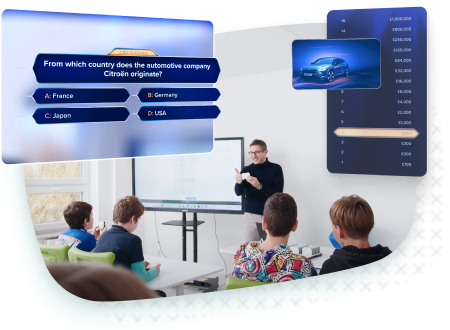
Thanks to interactive tools, every student takes an active part in the lesson. The system activates even the most withdrawn class participants.
Podgląd
Gamification in Any Subject
Introduce elements of healthy competition in math, history, or language arts. Boost student motivation through points and rankings.
Podgląd
Instant Feedback
Each activity ends with automatic feedback, allowing teachers to objectively evaluate the effectiveness of their lessons.
Podgląd
Faster Lesson Preparation
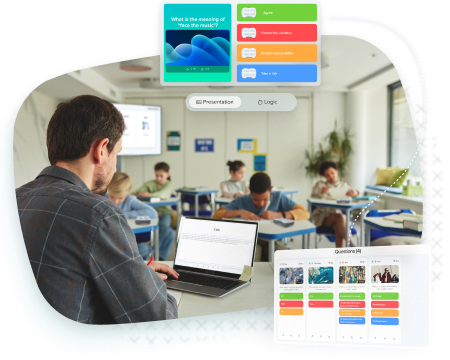
Save time with ready-made resources and an extensive library. Creating engaging lesson scenarios now takes just moments.
Podgląd
Simple Implementation. No Costly Infrastructure
The system runs in a browser, no technical support issues. Students don't need Wi-Fi.
Podgląd
Podgląd funkcji

Technology that doesn’t get in the way

Simplicity Providing for Excellence. The system was designed for non-technical people to be exceptional.

Devices

  • Do not require students to use Wi-Fi
  • Durable materials and efficient charging
  • Tactile feedback
  • Easy to operate, store, and transport

Application

  • Browser-based, no installation required
  • Runs on existing school devices
  • Lesson, game, and quiz creator with built-in library
  • Step-by-step tutorials built in

Analytics

  • Automatic reports after each activity
  • History of scores for each activity – by student or class

Great Technology for Instruction not Obstruction

Teachers

  • Spend less time fighting with technology
  • Fully control the course of the lesson
  • Develop their workshop
Nauczyciele

Students

  • Play, compete, learn
  • Increase confidence
  • Receive immediate feedback
Uczniowie

Schools

  • Creates focused, consistent learning environment
  • Provide teachers with ready-made tools
  • Provides a proven solution to boost engagement
Szkoła

Districts

  • Optimize the education budget
  • Get clear, real-time insight into teaching
  • Create modern educational institutions
Samorządy

Foundations and NGOs

  • Maximize impact by providing clear insights
  • Support better learning outcomes
  • Ensure equal access to learning
Fundacje

Engagement across all grades and subjects

Pre-K / Kindergarten

Picture-based quizzes engage young children and help them stay focused on the task. Engagement without screens and costly devices.

Learn more

Elementary School

Gamification brings an element of play to education, making every lesson engaging.
Boost independence with interactive learning and teachers with real-time learning insights.

Learn more

Middle-School/High-School

Increase motivation and accountability by showing instant progress reports that make it easier to prepare for exams.

Learn more

SEND Education

Provide personalized, structured learning with clear feedback and positive reinforcement, helping SEND students stay engaged and confident while giving teachers full visibility into progress and needs.

Learn more

Valued by teachers, loved by students

Education Partner
Education Partner

FAQ

What subjects can I teach with Classwise?2026-01-19T14:19:48+00:00

You can use Classwise in any school subject. If the Library of ready-made projects does not currently contain resources that interest you and that you would like to use in your classes, you can use the Content Creator to create your own lessons and resources, such as presentations, educational games or quizzes.

Can additional Classwise products be purchased?2026-01-19T13:46:20+00:00

Yes, you can buy each element of the Classwise system separately, i.e. the Docking Station in a set with Control Hub or Classpads. Classpads can also be purchased individually or in sets of 10.

How many classes/teachers can use one Classwise kit?2026-01-19T13:47:53+00:00

There is no limit to the number of classes or teachers using one set. Each teacher can create an account in the app and create any number of classes in it.

Is it possible to connect and assign Classpads from different Classwise kits?2026-01-19T13:49:34+00:00

Yes, Classpads can be mixed and swapped between kits. Please remember to pair them back with their original Control Hub after each swap.

What are the Classwise kits and how do they differ?2026-01-19T13:47:20+00:00

Each kit consists of a Docking Station to charge and carry the controllers, a Control Hub to manage and connect them to a computer and a specific number of Classpads for the students.

Standard kits come with 10, 20, 30 or 40 Classpads. Of course, you can use any number of Classpads, but no more than 40, as this is the maximum capacity of the Docking Station.

FAQ

What subjects can I teach with Classwise?2026-01-19T14:19:48+00:00

You can use Classwise in any school subject. If the Library of ready-made projects does not currently contain resources that interest you and that you would like to use in your classes, you can use the Content Creator to create your own lessons and resources, such as presentations, educational games or quizzes.

Can additional Classwise products be purchased?2026-01-19T13:46:20+00:00

Yes, you can buy each element of the Classwise system separately, i.e. the Docking Station in a set with Control Hub or Classpads. Classpads can also be purchased individually or in sets of 10.

How many classes/teachers can use one Classwise kit?2026-01-19T13:47:53+00:00

There is no limit to the number of classes or teachers using one set. Each teacher can create an account in the app and create any number of classes in it.

Is it possible to connect and assign Classpads from different Classwise kits?2026-01-19T13:49:34+00:00

Yes, Classpads can be mixed and swapped between kits. Please remember to pair them back with their original Control Hub after each swap.

What are the Classwise kits and how do they differ?2026-01-19T13:47:20+00:00

Each kit consists of a Docking Station to charge and carry the controllers, a Control Hub to manage and connect them to a computer and a specific number of Classpads for the students.

Standard kits come with 10, 20, 30 or 40 Classpads. Of course, you can use any number of Classpads, but no more than 40, as this is the maximum capacity of the Docking Station.

Go to Top